
Toast (Status Message)
A toast is a transient status confirmation ("Saved", "Copied to clipboard") that appears following user interaction and dismisses automatically after a brief timeout.
Because no native HTML element exists for transient status messages, the most pervasive failure mode is timing: the notification unmounts from the DOM before assistive screen readers can announce it.
Live Demo
Click the trigger buttons repeatedly below to observe toast stacking behavior, where older notifications visually recede with a maximum stack limit of 3 items before automatic dismissal:
Keyboard Interaction
| Key Interaction | Expected Behavioral Contract |
|---|---|
Tab | Focus the action trigger button; focus is never diverted to toast messages |
Enter / Space | Triggers the action and dispatches the toast notification while preserving focus on the button |
Pointer Interactions
| Pointer Action | Expected Behavioral Contract |
|---|---|
| Click Trigger Button | Dispatches a toast notification into the designated display region |
Rules
- Place the toast live region in the DOM, empty, from page load MUSTUI-R42
- Put an empty element with
role="status"andaria-live="polite"in the page from the start and only swap its text when notifying. A region created together with the message may not be announced. - Check:
TST-01TST-01Empty live region✕ NGThe text may not be announced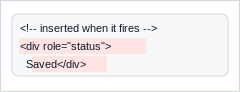 ✓ OKEmpty first, text added later
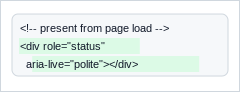
- Use
politefor completion notices, andassertiveorrole="alert"only for urgent errors MUSTUI-R43 assertiveinterrupts whatever is being read. Keeping it for situations that need immediate action avoids stopping users for no reason.- Check:
TST-02TST-02Use polite for success✕ NGSuccess message interrupts speech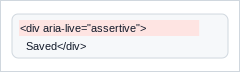 ✓ OKAnnounced at the next pause
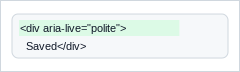
- Do not move focus to a toast when it appears MUST NOTUI-R44
- A toast only informs. With focus left where it was, users carry on with their work.
- Check:
TST-03TST-03Focus stays put✕ NGFocus jumps to the toast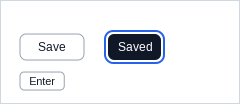 ✓ OKFocus stays on the button
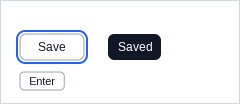
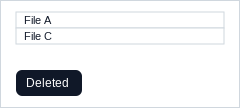
- Do not report important results such as deletions or updates by toast alone MUST NOTUI-R45
- Toasts disappear over time. Make the result visible on the page itself too, such as the item leaving the list or the new value being shown.
- Check:
TST-04TST-04Not toast-only results✕ NGResult not reflected on screen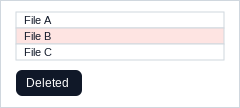 ✓ OKAlso gone from the list
- Set a limit on simultaneous toasts and how long they stay SHOULDUI-R46
- Keep the limit to about 3–4 and drop the oldest beyond it. Repeated actions do not bury the screen in notices.
- Check:
TST-05TST-05Cap and display time✕ NGToasts pile up without limit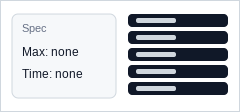 ✓ OKState both in the spec
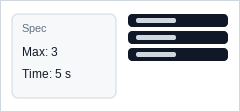
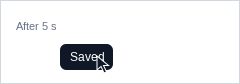
- Pause the auto-dismiss timer while the pointer is over a toast SHOULDUI-R47
- The notice does not vanish before it is read.
- Check:
TST-06TST-06Pause on hover✕ NGDisappears under the pointer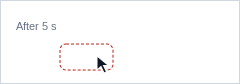 ✓ OKStays while hovered
Implementation
A complete, production-grade module satisfying all requirements above:
View Source Code (HTML Markup and JavaScript Module)
html
<button type="button" id="save-btn">Save settings</button>
<button type="button" id="copy-btn">Copy link</button>

<!-- Live region pre-rendered empty in initial DOM markup -->
<div id="toast-region" role="status" aria-live="polite" aria-atomic="true"></div>
javascript
// modules/toast.js
export function showToast(region, message, { duration = 3000, max = 3 } = {}) {
  const toast = document.createElement('div')
  toast.className = 'toast-item'
  toast.textContent = message
  region.appendChild(toast)

  // Discard oldest toasts when exceeding maximum stack limit
  while (region.children.length > max) {
    region.firstElementChild.remove()
  }

  let timer = setTimeout(() => {
    if (region.contains(toast)) {
      toast.remove()
    }
  }, duration)

  // Pause dismissal countdown on hover
  toast.addEventListener('mouseenter', () => {
    clearTimeout(timer)
  })
  toast.addEventListener('mouseleave', () => {
    timer = setTimeout(() => {
      if (region.contains(toast)) {
        toast.remove()
      }
    }, 1500)
  })
}

// Execution example
const region = document.getElementById('toast-region')
document.getElementById('save-btn').addEventListener('click', () => {
  showToast(region, 'Settings saved successfully')
})
document.getElementById('copy-btn').addEventListener('click', () => {
  showToast(region, 'Link copied to clipboard')
})- Return to Keyboard & ARIA Patterns