
JavaScript Implementation Standards
Rules for JavaScript that is maintainable, fast, secure and accessible. Each rule states its strength (MUST / MUST NOT / SHOULD) at the end of its summary, and each section lists rules from strongest to weakest.
Check for a Built-in Feature First
Before writing a script, check whether an HTML element or CSS can do the same job. Built-in features mean less code, better performance, and keyboard and screen reader support from the start.
| What you need | Built-in feature | Why use it |
|---|---|---|
| Panel / accordion toggle | <details> / <summary> | Keyboard and assistive technology support with no script |
| Modal dialog | <dialog> + showModal() | Focus containment and Escape to close come built in |
| Smooth scrolling | scroll-behavior: smooth | One line of CSS |
| Element that follows scrolling | position: sticky | No scroll listener to run |
| Lazy-loaded images | loading="lazy" attribute | The browser schedules loading optimally |
| Basic input validation | required, type, pattern, :user-invalid | Browser-native error messages |
| Tabs / carousels | Revisit the design | Accessibility is costly to get right, so confirm they are really needed first |
- Do not build in JavaScript what HTML or CSS already does SHOULDCD-R12
- Use the built-in features in the table above. Custom versions add maintenance work and room for defects.
- Check:
CD-12
Basics
- Compare with
===/!==, never==/!=MUSTCD-R13 ==coerces types, so unintended values compare as equal.- Check:
CD-13 - Return early when the target element is missing MUSTCD-R14
- Check at the top of each function so the script does not fail on pages without the element, or when it is loaded twice.
- Check:
CD-14 - Do not create global variables MUST NOTCD-R15
- Even where ES modules cannot be used (build constraints, inline scripts), keep variables out of the global scope.
- Check:
CD-15 - Do not use
varMUST NOTCD-R16 - Declare with
constorlet. - Check:
CD-16 - No jQuery or other legacy libraries in new projects MUST NOTCD-R17
- Do not add a large library for something plain JavaScript does in a few dozen lines, either.
- Check:
CD-17 - Load scripts with
<script type="module">SHOULDCD-R18 - Modules keep the global scope clean, need no IIFE wrapper, and run after HTML parsing, like
defer. - Check:
CD-18 - Declare variables that are never reassigned with
constSHOULDCD-R19 - Use
letonly for variables that must be reassigned. - Check:
CD-19
Returning early when the element is missing:
javascript
const trigger = document.querySelector('[data-accordion-trigger]')
if (!trigger) {
  return
}
Files and Modules
text
assets/js/
├── main.js            # Entry point: initializes the modules on the page
└── modules/
    ├── accordion.js
└── form-validation.js- Select elements by
data-*attributes MUSTCD-R20 - Do not use styling classes as selectors, so design changes do not break scripts.
- Check:
CD-03 - One module, one feature SHOULDCD-R21
- Export an initialization function that takes the component's root element as its argument.
- Check:
CD-20 - Show and hide with
hiddenor a state attribute SHOULDCD-R22 - Use the
hiddenattribute ordata-stateinstead of settingelement.style.display, so presentation stays in CSS. - Check:
CD-21
A module:
javascript
// modules/accordion.js
export function initAccordion(root) {
  const trigger = root.querySelector('[data-accordion-trigger]')
  const panel = root.querySelector('[data-accordion-panel]')

  if (!trigger || !panel) {
    return
  }

  trigger.addEventListener('click', () => {
    const isExpanded = trigger.getAttribute('aria-expanded') === 'true'
    trigger.setAttribute('aria-expanded', String(!isExpanded))
    panel.hidden = isExpanded
  })
}
javascript
// main.js
import { initAccordion } from './modules/accordion.js'

document.querySelectorAll('[data-accordion]').forEach(initAccordion)
Toggling visibility:
javascript
// Incorrect: inline styles get in the way of CSS control and animation
element.style.display = 'none'

// Correct: the hidden attribute works together with CSS
element.hidden = true
Accessibility
- A custom component is done only when keyboard operation, focus management and ARIA states all work MUSTCD-R23
- See the Custom UI Guidelines for specifications and patterns.
- Check:
CD-22
Performance
- Throttle
scrollandresizehandlers MUSTCD-R24 - Use debounce or throttle so heavy work does not run on every event.
- Check:
CD-23 - Remove listeners added to
windowordocumentMUSTCD-R25 - Call
removeEventListeneron SPA navigation or when a component is destroyed, to prevent memory leaks. - Check:
CD-24 - No render-blocking scripts in
<head>MUST NOTCD-R26 - Use
type="module"ordeferso scripts run after HTML parsing. - Check:
CD-25 - Watch position and size with
IntersectionObserver/ResizeObserverSHOULDCD-R27 - Lighter and more accurate than calculating positions from scroll offsets.
- Check:
CD-26 - Batch DOM reads before writes SHOULDCD-R28
- Do not alternate reads such as
offsetWidthorgetBoundingClientRect()with style changes; each switch forces the browser to recalculate layout. - Check:
CD-27
Error Handling and Security
- Wrap
fetchintry...catchand tell users when it fails MUSTCD-R29 - On network or HTTP errors, show on screen what went wrong.
- Check:
CD-28 - Insert untrusted data with
textContentMUSTCD-R30 - Never put user input or external data into
innerHTML. When HTML must be inserted, sanitize it first. Unsanitized, it lets malicious scripts run (XSS). - Check:
CD-29 - No API secret keys or auth tokens in code MUST NOTCD-R31
- Anyone can read built JavaScript.
- Check:
CD-30
Preventing XSS:
javascript
// Incorrect: parsed as HTML, so a malicious script can run (XSS)
container.innerHTML = userInputComment

// Correct: inserted as plain text
container.textContent = userInputComment
What Not to Use
- No
document.write(),eval()or HTMLon*attributes MUST NOTCD-R32 - They create security holes and conflict with Content Security Policy (CSP).
- Check:
CD-31 - No
alert(),confirm()orprompt()in deliverables MUST NOTCD-R33 - They block interaction, and their look and wording cannot be adjusted.
- Check:
CD-32 - No branching on the User-Agent string MUST NOTCD-R34
- Test for the feature itself (feature detection). User-Agent checks break as browsers update.
- Check:
CD-33 - No
console.log()ordebuggerleft in production code MUST NOTCD-R35 - They add noise to users' consoles, and
debuggerhalts anyone with developer tools open. - Check:
PRF-03PRF-03Leftover debug code✕ NGconsole.log left in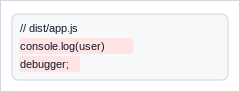 ✓ OKNo debug code
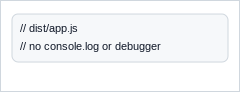 Stripped from production,
CD-34